Author Archives: Daniel Jalkut

Bitsplitting Podcast Hiatus

Earlier this year, I announced the Bitsplitting podcast, explaining that I hoped to establish a new kind of “tech podcast” that is more of the genre perfected by Terry Gross of NPR’s Fresh Air:

I’ll differentiate my show from some others by focusing more on the personal background of my guests, and on trying to discern a philosophical arc to their life and career choices.

Ten episodes later, I am proud to claim that I’ve achieved that. Thanks to an incredible list of thoughtful, well-spoken guests who agreed to join me on the show, I have something fabulous to show for the hard work that went into making this happen.

And now I need a break.

Planning, recording, editing, promoting, and funding the Bitsplitting podcast is both more difficult and more rewarding than I expected. I started off very anxious about the challenge of producing a show that meets my standards, and I have for better and for worse remained very anxious about many aspects of the show. Sticking to a schedule and pep-talking myself into believing that I am doing a good job (I do, most days!), is a lot more tiring, physically and emotionally, than I expected. Not to mention I have lots of other projects on my plate.

By taking a break and adopting an irregular “series” schedule for the show, where I am not committed to the never-ending pressure of pushing out the next show, I hope that it will give listeners a chance to catch up and enjoy the work that has been done, and give me a chance to think about how the show should evolve going forward.

Thank you very much to all the listeners and sponsors who supported the show from its infancy through its still-young, but gratifyingly successful state today.

Bitsplitting With Jason Snell

Episode #10 of the Bitsplitting podcast features my friend Jason Snell of IDG and The Incomparable podcast.

Jason’s role as editor of Macworld made him familiar to me as a Mac enthusiast and indie software developer. After I acquired MarsEdit in 2007, I had the opportunity to chat a bit with Jason about his own use of the app. Over the years since then, I’ve had the fortune to meet with Jason during WWDC and occasionally when he visits the Boston area for his work.

Thanks for joining me on Bitsplitting, Jason!

Bitsplitting With Jean MacDonald

Episode #9 of the Bitsplitting podcast features my friend Jean MacDonald, who recently founded App Camp For Girls. Jean and I know each other through our respective efforts to boost our small Mac and iOS-based software companies. She is a partner at Smile Software where she focuses on marketing, PR, and customer satisfaction, among other things.

Over the years I have had the pleasure of catching up with Jean at various conferences and, when the stars align, in the Karaoke bars. I have always been impressed by Jean’s indomitable spirit in both her personal and professional endeavors. Thanks, Jean, for joining me on the show.

Bitsplitting With Marco Arment

Episode #8 of the Bitsplitting podcast features my friend Marco Arment. We got to know each other at first on a professional level when he was the lead developer at Tumblr. When I was working on initial Tumblr support for MarsEdit, Marco helped by adding a number of enhancements to the Tumblr API.

Since then Marco has left Tumblr, founded Instapaper, sold Instapaper, founded The Magazine, and sold The Magazine. That’s among other things, and not necessarily in that order. I’ve had the good fortune of getting to know Marco better as a friend and colleague as we each pursue our indie software development, blogging, and podcasting ambitions. Thanks for joining me on the show, Marco!

Bitsplitting With Buzz Andersen

I’ve just published Episode #7 of the Bitsplitting podcast, featuring my friend Buzz Andersen. Buzz and I got to know each other online after I somewhat embarrassingly called him out for, get this, declining to participate in the Cocoa Radio interview podcast.

In the intervening years we have gotten to know each other better through our frequent run-ins at WWDC, and from, for a short while, both living the New York City area. In chatting with Buzz I learned more about his childhood growing up in Denver, the things he values in cooking and mixology, and many other nuanced aspects of Buzz’s approach to life and work. Thanks for coming on the show, Buzz!

What’s That Color?

For a long time I’ve been interested in Adobe’s Kuler, dedicated to the art and science of choosing aesthetically pleasing color combinations. Or unpleasing color combinations, if that’s your thing.

Today, Adobe released an iOS app for capturing and tinkering with color palettes. The palettes can then be automatically saved for retrieval through the Kuler web site, or shared via email or Twitter.

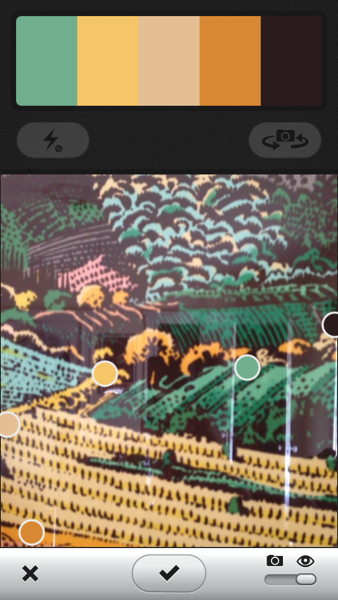
Playing around in my office, I pointed Kuler at the Milton Glaser “View from Greve” print on my wall (graciously gifted by Glenn Fleishman). Obviously, Mr. Glaser deserves most of the credit for choosing this color scheme, but Kuler earns some points for picking up on some of the key elements:

User interface of the Adobe Kuler iOS app.

If you don’t like the colors Kuler latches on to, you can move the camera slightly to provoke it to rejigger its choices. Or, tap the screen to freeze the camera, then move the sample points on the image to precisely the color of interest.

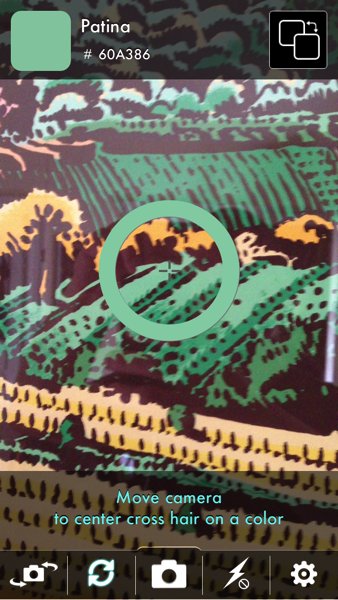
Another tool I’ve used in the past is Color Identifier, which has a more streamlined utility for capturing solitary colors while further attempting to give a name and HTML-style hex color string to the captured value.

UI of the Color Identifier app.

I love this class of iOS app because it follows through on the promise of using a combination of technologies to grant superpowers to users. A camera or a computer by itself is of limited value for quickly cataloging something as precise as a set of colors from the environment, but a camera and computer united by clever software, all in the palm of your hand, is an exciting tool indeed.

Bitsplitting With Amanda Wixted

The latest podcast episode is live, featuring Amanda Wixted of Zynga and Namco fame. I met Amanda several years ago at (I believe) the second C4 conference in Chicago. Since then I have had the opportunity to run into her at various conferences, and was honored to have her join me in New York for the iOS Radio Hour, along with Buzz Andersen and Marco Arment.

I was surprised to learn that Amanda grew up primarily in Europe and the Middle East, and yet she wound up attending High School in Pebble Beach, California, near my home town of Santa Cruz. I hope you enjoy learning more about her story and the path that led her to a career as a professional mobile game developer. Thanks for joining me on the show, Amanda!

Respect The Crowd

Everybody knows Apple’s maps are not as good as Google’s maps.

If somebody had belligerently stated a year ago that “Apple is not going to just walk in and be a serious player in maps,” they would have been proven right. Apple shipped their own Maps app on iOS 6, displacing the Google maps that had been a key component of the operating system since 1.0, and set the overall usability and “magic-ness” of iOS back a few notches.

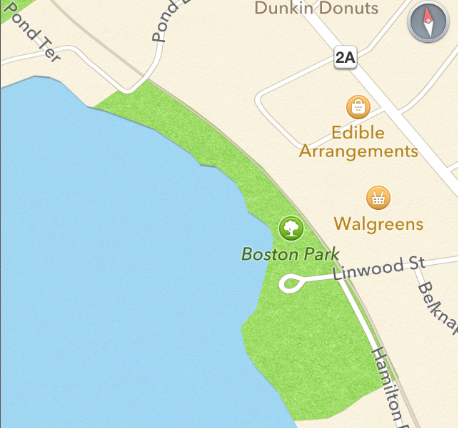
It’s all about the data. It doesn’t matter how beautiful Apple’s maps are, or how quickly they load, if they consistently assign wrong names and locations to the businesses and landmarks that customers search for on a daily basis. Here’s a map of “Spy Pond Park,” a neighborhood playground and baseball field that is central to many iPhone-toting parents’ regular routines. Inexplicably, Apple’s Maps refers to it as “Boston Park”:
SpyPondPark

Upon upgrading to iOS 6, this landmark was one of the first locations I looked up. Finding it mislabeled, I dutifully selected the “Report a Problem” option and submitted detailed correction information.

That was over 6 months ago. Today it’s still “Boston Park” on my phone. And it’s infuriating.

It’s not just “Boston Park.” My local post office shows up on the wrong side of the street. The nearest Whole Foods supermarket is purported to exist in an industrial park behind the local subway station, when it is actually located across the expressway and down the road about 1/4 mile. Other parks in my town are represented as large blank areas on the map, not locatable by name, even through trial and error.

Each of these issues is minor in isolation, but the weight in accumulation is enough to drive any sensible person to another mapping solution. If you can’t trust your Maps app to get you where you need to be, then you can’t use the Maps app. That is unfortunate, indeed.

I was among the most excited of Apple fanboys when I first heard the rumors about Apple entering the mapping market. I put my faith in Apple’s ability to zero in on the remaining nuanced usability problems in maps: the things that Google had overlooked. Instead, I learned upon updating that I had lost access to the effortless transit directions I had grown so accustomed to, and lost all faith in the accuracy of Maps’s data.

It would be foolish to expect perfection from any map, but to be a serious contender the data has to be reputable enough that mistakes are an exception rather than the rule. But more importantly for an app with such a critical impact on day-to-day living, it’s imperative that corrections to the data be as useful to the consumer as to the vendor. Currently, corrections to Apple’s Maps app are only useful to Apple, presuming they are taking them into consideration at all.

In the old days of paper maps, we expected the data to be mostly accurate, but could accommodate an occasional error. Street names change. Town borders shift. Highways are demolished and reconstructed. But in the old days, corrections were also as easy as applying pen to paper: mark out the mistake and clarify the current state of the world. One deft move and the problematic map was fixed — for the owner — forever.

I commend Apple for including the “Report a Problem” feature in their Maps app from day one. They knew that the data was not bulletproof, and they understood that their vast, loyal user base was a great resource for improving it. But I think this reporting process is failing Apple precisely because corrections to Apple’s maps lack all of the advantages of the-fashioned old pen & paper method. After laboriously detailing the problems with a point of interest in Apple’s maps, correcting its name, dragging its pinpoint to a corrected location, etc., the user is rewarded with continuing to suffer using the app with the incorrect data.

These are the most important points of data in Apple’s maps: the ones that a specific user has taken pains to refine and finesse. And Apple opts to leave them in their infuriating, sometimes dangerous state of error, making the app decreasingly useful to the customer.

I’m holding out hope that Apple is working on some major coup for the integrity of their mapping data. It would be fantastic if they announced at WWDC, for example, that they have listened to feedback from developers and customers, and are embracing some new approach to gathering and refining mapping data. Could they have something up their sleeve that would facilitate leap-frogging Google and other POI data-mongers? We can only hope.

In the absence of such improvements they should offer their users something akin to the instant fixes that were afforded by pen and paper. When I report to Apple through my own copy of Maps that the post office is in the wrong place, it should no longer be up for debate where the post office is. When I state with no uncertainty that “Boston Park” is actually called “Spy Pond Park,” I should from that point onward be able to request “directions to Spy Pond Park” without frustration.

Crowdsourcing data refinement can be a very powerful tool. Look at the success Wikipedia has had in their efforts to catalog, in a nutshell, high-level synopses of all the world’s encyclopedic data. Wikipedia works because well-intentioned contributors who spot an omission or error in the data can submit a fix and see the changes immediately. Never again (unless the change is explicitly backed out) will they be punished by reading the non-factual or incomplete information that prompted them to take action.

There are good arguments for why Apple can’t be quite as open as Wikipedia, or to choose a more apt comparison, as open as OpenStreetMap. Apple puts their brand on the iPhone because it is supposed to exude quality, and they expect to be held responsible for the quality of that product from top to bottom. Completely opening mapping data for iOS would undoubtedly lead to attempts at sabotaging Apple’s reputation by injecting embarrassingly incorrect data into the database.

On the other hand, completely botching map data in many locales, while doing little or nothing to address the problem, is also detrimental to Apple’s brand. I used to sing the praises of my iPhone above all competitors. Now, when I am jarred from my fanboy-hypnosis, staring down at an alleged life-changer that doesn’t know how to get me from point A to point B, I’m not so convinced I can defend it.

In order for Apple’s customers to continue “reporting a problem” with Maps, they need to feel that their reports are having some impact. They need to feel respected. Ideally, good reports would lead to timely corrections on a mass level that would benefit all other iOS users. Anecdotally, this is not happening. So at a minimum a user’s own report should be respected by the device they hold in their hands. Let the customer know their voice was heard by improving the usability of their device immediately. Customers demand confidence in map data, whether it be from Apple or fine-tuned by their own hand. If we can’t count on map data, we won’t use the app, we won’t report problems, and we won’t help Apple one iota in shoring up this massive shortcoming.
Bitsplitting With Brent Simmons

Episode 5 of the Bitsplitting Podcast is up, featuring my friend Brent Simmons of NetNewsWire, MarsEdit, and Glassboard fame.

After getting to know Brent a bit online through the developer community, I finally got the chance several years ago to meet him in person at the very first C4 conference. It was only a short time after meeting that he approached me about acquiring MarsEdit. The rest, as they say, is history. I now have the pleasure of seeing Brent once or twice a year. I always have a blast chatting, laughing, and sometimes singing with him.

It was a great time talking with Brent about his upbringing in the greater Philadelphia area, his frustrated attempts to finish college, and the circuitous path that led him to starting his own software company. Thanks for joining me on the show, Brent!

You Can Check Out Anytime You Like

A week or so ago on John Gruber’s The Talk Show, Gruber and special guest John Moltz recapped the situation with WWDC selling out and with the sprinkling of alternative conferences and events springing up to fill excess demand during the same week in San Francisco. Among those conferences is altWWDC, put on by folks from Appsterdam, and the CocoaConf Alt conference.

During the podcast they remarked on the use of “WWDC” literally in the naming of “altWWDC,” and joked about how likely it was that Apple would take notice and demand something change on that front. As far as I know, altWWDC has escaped thus far unscathed, but CocoaConf Alt has not been so fortunate:

We had secured space in the hotel directly next door to the big show, and we were putting together a phenomenal list of speakers. Ticket sales were better than we had hoped. All was well until we got an email from the Intercontinental San Francisco, saying that they had determined that our event was in conflict with Apple and that due to their contract with Apple, we couldn’t use the space.

Taken at face value: CocoaConf reserved space in a reputable San Francisco hotel, counted on that reservation to sell tickets and to begin organizing the conference in earnest, and now the hotel has backed out of its agreement.

There is a lot of “who, what, when, why and how” missing here. Did Apple specifically ask the Intercontinental to cancel the deal with CocoaConf upon learning about it, or did somebody at the hotel discover a conflict while reviewing the contract terms and proactively seek to avoid an issue with Apple? My hunch is that the hotel is either overacting on its own initiative, or that some individual at Apple is overacting without the full, reasoned consent of Apple’s leadership.

Whatever went down, and whoever is to blame for it: this is not good for developers, not good for San Francisco, and not good for Apple. In an era when WWDC conferences sell out in minutes, it’s only natural that other events would rush in to help to fill the void. And it’s only natural that some of those events will seek to capitalize on the momentum of Apple’s huge event already drawing the spotlight on San Francisco and attracting hundreds if not thousands of additional visitors who are not registered attendees of the conference.

Apple should actively encourage parallel events such as these. They could even go a step further by participating to a limited extent in the events. Sending a few company representatives out to float among each of the satellite activities would give attendees of those events a sense of connectedness to Apple without overly-straining Apple’s limited resources inside the conference.

One of the major benefits of WWDC to Apple is to draw the world’s attention the company’s relevance to desktop and mobile developers, and to how eager the company is to serve them. Even being cited as the cause of quashing meet-ups in the periphery of WWDC is not in the service of that goal. If Apple was involved in pushing for this decision, they should clarify and retract that position. If they were not involved, they should take care to ensure that the hotels they sign contracts with in the future understand they hold no ill will towards these events.

I’m Feeling Useless

I was intrigued to see that Google has changed the country identification for Palestine from “Palestine territories” to just “Palestine.” A subtle but serious hint that the company recognizes Palestine’s right to independent statehood.

I was sort of mystified, however, by John Gruber’s observation that the “I’m Feeling Lucky” button in the BBC’s screenshots instead show the text “stroke of luck.” It would be one thing to learn that the phrase is localized to various regional English dialects around the world, but in my brief tests I have yet to find a single other English Google site where the button text is altered. I also find it very strange that the button text in the screenshot is lowercased. It’s literally “stroke of luck” and not “Stroke of Luck” as one would expect, to fit in with both conventional UI design and with the rest of Google’s UI.

Looking closer, I see the standard “Google Search” button shows up as “Google search a”, and the “About Google” link at the bottom says (I think): “Never you like to know about Google.”

I am inclined to think that the source of the screenshot is the Palestinian Google home page translated automatically to some dialect of English by an automatic translation service (perhaps Google, itself). I don’t think Google has adopted “Stroke of Luck” as part of its revamping of the Palestine Google home page.

Looking into this got me interested in trying out the “I’m Feeling Lucky” button for the first time in many years. I returned to my native English www.google.com where, the text still reads “I’m Feeling Lucky,” but funnily enough you can’t actually use the button to meaningfully achieve what it used to: jumping to the one presumably most-relevant result for your search. Why? Because the moment you type any text in the search field, a prerequisite for using the “I’m Feeling Lucky” button, the entire UI of Google’s famously simple home page shifts dynamically to a completion-list-oriented UI. The lucky button is long gone. Look carefully, and you’ll see there are now “I’m Feeling Lucky” links next to each completion-list result, but these are only visible if you arrow-select, or hover your mouse over the item in the list.

So what is the point of the “I’m Feeling Lucky” button on Google’s home page? You can only click it before you’ve bothered to type anything. On the Palestinian Google home page, clicking the button takes you to Google’s doodles page. But on the American Google home page, merely hovering a mouse cursor over it will change its text to something even more whimsical: “I’m Feeling Wonderful,” “I’m Feeling Stellar,” or “I’m Feeling Puzzled,” for example. Thereafter, hovering over the button Click one of these and you’ll be shuttled off to some vaguely appropriate internet destination.

The “I’m Feeling Lucky” button hasn’t, to my knowledge, been changed to “stroke of luck” in any regional version of Google’s home page. It has, however, been changed into a useless button whose behavior has no relevance to the original “most-relevant result” behavior. It’s just a piece of useless junk on Google’s otherwise still admirably minimalist home page.

Update: Matthew Panzarino commented on Twitter that the dynamic removal of the button is caused by the Google Instant feature, which users can turn off to restore traditional functionality. To Google’s credit, the preference can even be selected without logging in to a user account. However, given that the traditional behavior of the button now works only in a non-standard, user-customized configuration, I think it would best be ejected from the home page.